TransformJ: Embed
General Description
This plugin embeds images into larger images at a specified position and with specified background filling.
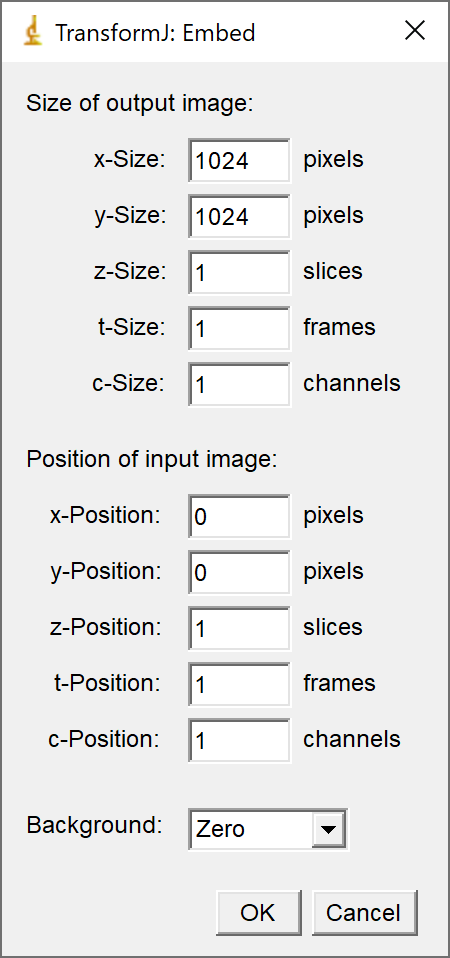
Dialog Description
x-Size
The size of the output image in the x-dimension (specified in pixels).
y-Size
The size of the output image in the y-dimension (specified in pixels).
z-Size
The size of the output image in the z-dimension (specified as number of slices).
t-Size
The size of the output image in the t-dimension (specified as number of frames).
c-Size
The size of the output image in the c-dimension (specified as number of channels).
x-Position
The position within the output image of the first element of the input image for the x-dimension (specified in pixels).
y-Position
The position within the output image of the first element of the input image for the y-dimension (specified in pixels).
z-Position
The position within the output image of the first element of the input image for the z-dimension (specified as slice number).
t-Position
The position within the output image of the first element of the input image for the t-dimension (specified as frame number).
c-Position
The position within the output image of the first element of the input image for the c-dimension (specified as channel number).
The size of the output image must be at least 1 in each dimension and the position within the output image of the first element of the input image for each dimension must be chosen such that the input image fits entirely in the output image starting from that position. If this is not the case, an error message is generated and the operation aborted. The plugin adheres to the indexing convention used in ImageJ. That is, indices start at 0 in the x- and y-dimension, but at 1 in the higher dimensions.
Background
The output image will be at least as big as the input image. If it is larger, the remainder of the output image can be filled with either zero, or the minimum or maximum value in the input image, or by repeating, mirroring, or clamping the values in the input image. Mirroring is done round the centers of the first and last elements in each dimension.
