TransformJ: Options
General Description
This plugin enables the user to set the global parameters used by the other plugins in the TransformJ package.
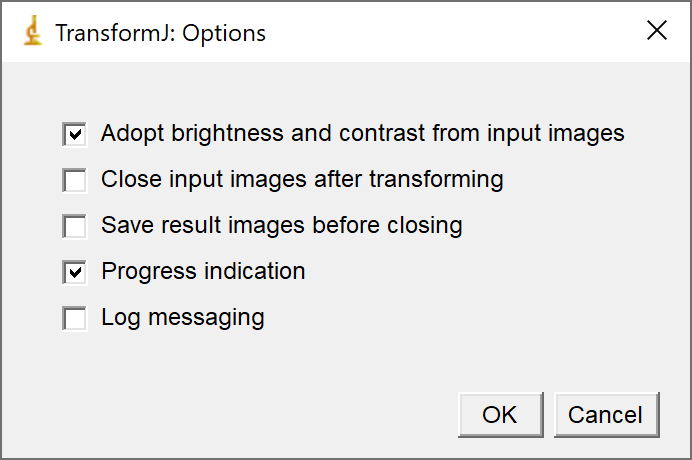
Dialog Description
Adopt brightness and contrast from input images
If selected, result images are displayed with the same brightness and contrast settings as the corresponding input images. Otherwise the brightness and contrast will be set such that the maximum result value is mapped to the maximum displayable value, and the minimum result value is mapped to the minimum displayable value.
Close input images after transforming
If selected, ImageJ always closes the input image processed by a plugin, after the plugin has finished. This is useful if the original input images are no longer needed after a plugin has produced the requested result images.
Save result images before closing
If selected, ImageJ always asks whether or not the user wants to save the result images before the images are closed. This is useful if one wants to exclude the possibility of accidentally closing an image.
Progress indication
If selected, the plugins will indicate their progress, using the progress bar of the ImageJ window.
Log messaging
If selected, the plugins will generate log messages, which appear in the log window of ImageJ. Most of these messages originate from the ImageScience library. In this library, the image elements are indexed from 0 in all dimensions, as opposed to ImageJ and Image5D, where the z, t, and c-dimension are indexed from 1. Thus, in the log window, there is a discrepancy of 1 in the reported indices of the latter dimensions.
Upon clicking OK, the options are stored by ImageJ and saved to its preferences file when quitting. Every time a plugin is used, these preferences are loaded. This facilitates adapting the default behavior of the package to the wishes of the user.
